
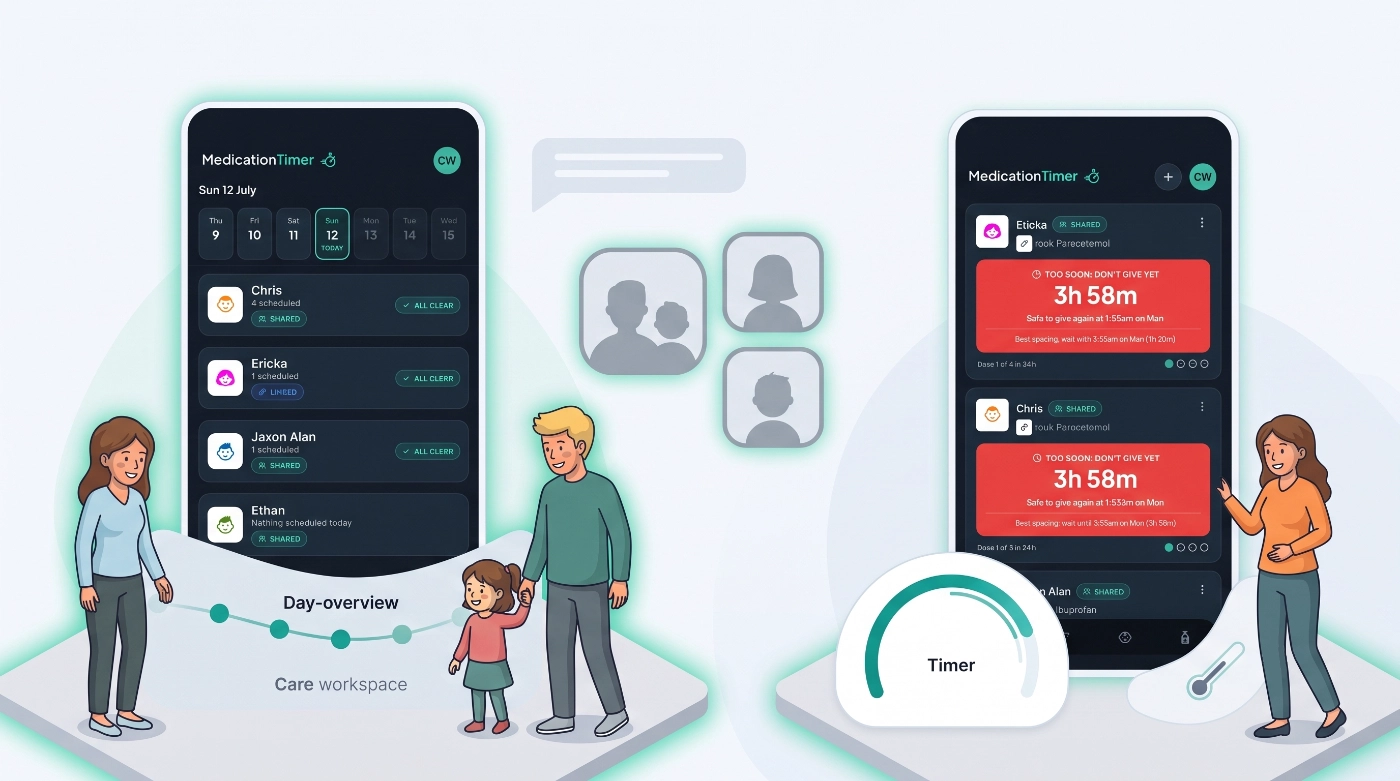
Some households want Today and Care for a full overview when someone is unwell. Others mainly need classic as-needed timers and a temperature log, without a calendar workspace in the way.
2.5.4 lets you pick Family or Simple during setup (or later in Settings), build your household faster with avatars and optional nicknames, and turn tabs on or off to match how you care for people. Links to launch.medicationtimer.com can also open directly in the app on iPhone and Android, so reminders, invites, and shared links land on the right screen without an extra browser hop.
Available on iOS, Android, and the web app.
What's in 2.5.4
- Family or Simple app style: choose during onboarding or in Settings → Layout
- Faster family setup: say how many people to add, then names, avatars, and birth dates
- Member avatars and nicknames: silhouettes plus optional labels like Mum, Dad, Nana, or Partner
- Clearer relationships: Parent, Child, Partner, Caregiver, and more (legacy Mother/Father/Son/Daughter still display cleanly)
- One-tap log dose from an existing timer when it is safe to give again
- Custom tabs: show or hide Today, Care, Timers, and Temps
- App links: Universal Links on iPhone and App Links on Android open Medication Timer URLs in the app
Dose timing rules are unchanged. Layout preferences only change what you see, not when a dose is allowed.
Family or Simple
During setup you now choose how the app should feel.
Family is best when you care for others or want a full daily overview.
- Today: doses, routines, and readings at a glance
- Care: a focused workspace when someone is unwell
- Sharing with other caregivers stays front and centre
Simple is best for your own as-needed medicines with minimal setup.
- Classic Timers tab: log doses with one tap
- Temperature log when you need it
- No Today calendar or Care workspace by default
- Cleaner timer cards (less countdown detail clutter)
You can switch any time in Settings → App style. If neither preset fits, use the individual Tabs toggles for a custom layout.
Faster household setup
Family setup no longer starts with a dense grid of relationship tiles. You answer a simpler question first: how many other people will you track medicines for? Then you fill in each person (name, avatar, birth date, and optional nickname) before medications and the rest of onboarding.
If you chose Simple, Care and scheduled-routine steps are skipped so you can get to timers sooner. Family mode still walks through Care, scheduled meds, and health readings when those matter for your household.
Avatars and nicknames
Each family member can have:
- An avatar silhouette (for example parent, child, or neutral) so people are easy to spot in lists, pickers, and Care
- An optional nickname such as Mum, Dad, Son, Daughter, Nana, Grandad, Partner, or Baby, shown under their name where it helps
Relationship and avatar are separate now. Relationship is who this person is in the household. Avatar and nickname are how you recognise them at a glance. Existing members keep working; older Mother/Father/Son/Daughter values map to Parent/Child for display, and nicknames can be filled in from those legacy labels when helpful.
Log dose from a timer
When an as-needed timer turns green or orange, you can log another dose from that timer without rebuilding the form. The app reuses the same member, medication, and dosage, applies the same spacing and maximum-dose rules, and starts the next countdown.
In Simple mode, timer cards stay focused on the action you need, with less visual noise around min/ideal phases and dose pips. Safety rules stay the same.
Customise your tabs
Under Settings → Layout you can:
- Pick the Family or Simple preset
- Or toggle Today, Care, Timers, and Temps individually
A Family Care household can still keep Timers visible if they want both. A Simple user can turn Today back on later without starting over.
Also in 2.5.4
- Clearer medication repeat-dose fields when adding or editing medicines
- Onboarding and launchpad copy aligned with Family vs Simple
- Bug fixes and polish across family forms, timers, settings, and deep-link reliability on mobile and web
Medication Timer is not medical advice, diagnosis, or treatment. Seek professional care if someone is unwell or symptoms worsen; follow your clinician’s and pharmacist’s directions for doses and course length.
Questions? Browse the frequently asked questions or contact support from Profile in the app.







