
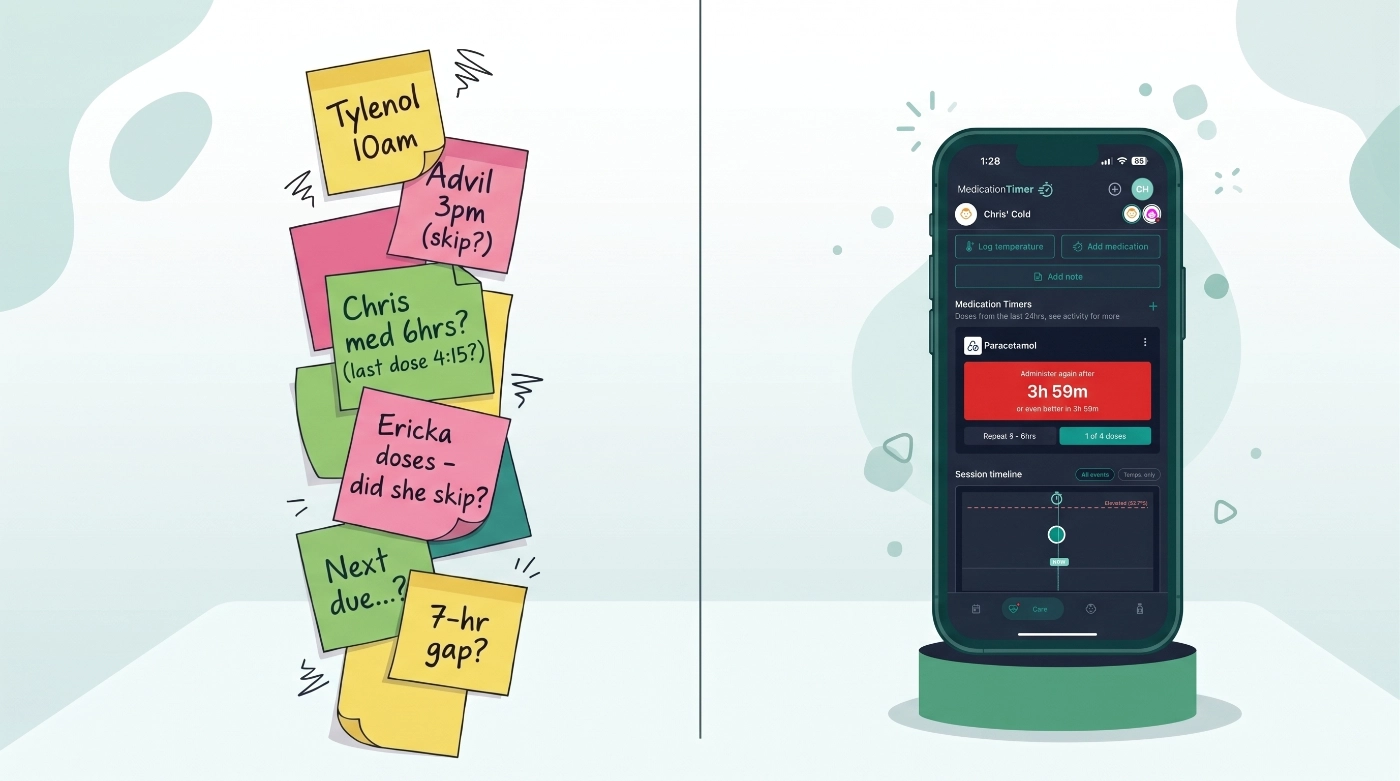
The thermometer beeps. The number is higher than you hoped. Your child is restless, your partner is still at work, and you are trying to remember whether you gave paracetamol at nine or ten. You are not failing. You are doing the ordinary work of a sick night, and ordinary work gets messy when sleep is thin and worry is loud.
That is the moment Care in Medication Timer is built for. On iPhone and Android, Care is your go to destination to manage your family's illness episode. It is where as-needed doses, fever readings, symptoms, notes, and short antibiotic courses live together instead of on a post-it note, a fridge chart, and three unread texts.
This guide walks through the mobile features that matter most when someone in your household is unwell. It is not medical advice. Always follow your doctor's and pharmacist's instructions for doses, when to seek urgent care, and how long to finish a prescribed course.
1. Start care: one focused session for one person
Most families start with manual systems. A post-it on the fridge for the last dose time. A notebook column for temperatures. A pharmacy bag with the antibiotic schedule scribbled on the back. Each works until someone else takes over at midnight and cannot read your handwriting, or the sticky note falls without you realising it.
Start care replaces that patchwork with one session scoped to this child and this week.
Tap Start care on the Care tab and choose who you are looking after. Each family member can have one active care session at a time, which keeps the screen honest: you are not juggling three half-finished episodes in one view.
You can label the episode (Flu, Stomach bug, Strep) so you can find it later in reports. Turn Temperature & symptoms on or off. When it is on, pick how often you want to be prompted for the next reading: every 30 minutes, 1 hour, 2 hours, or 4 hours. On the Family care plan, you can also set up a short medication course before you save, or add one later when a prescription arrives on day two.
The point is not more data for its own sake. The point is one calm place to work until the episode ends.
2. Next up: the one action that matters right now
At the top of an active session, Next up answers the question tired parents ask on repeat: what needs attention now?
The card surfaces the most urgent item for the person you are caring for. That might be an overdue antibiotic dose on a Family care plan course. It might be a temperature check that is due. It might be an as-needed medicine that is ready to give again, or a timer still counting down because it is too soon to re-dose.
Tap the action when it is offered: Log temperature, Administer dose, Mark taken for a course dose, and similar shortcuts.
Care tab badges and member chips use the same urgency signals. If another caregiver in your household opens the app, they can see who needs attention without a text thread at 1 a.m.
3. As-needed timers and quick timers
Paracetamol, ibuprofen, and antihistamines do not follow a calendar. They follow rules: minimum hours between doses, maximum doses in 24 hours, and the foggy memory of whether you already gave something is increased when you yourself are not feeling well.
Instead of crossing off times on a scrap of paper, Care tracks spacing rules for you inside the session. Due and overdue doses show in Next up. If it is too soon, you see that clearly rather than squinting at a smudged "9ish?" on a sticky note.
Quick timers save member and medication pairs as chips for faster logging when you are one-handed, half-asleep, or holding a glass of water. On mobile, that small speed gain matters. Sick days are measured in small wins.
Dose safety rules still apply everywhere in the app, including when you log by voice (more on that below). The app will not let you bypass spacing limits or daily maximums just because you are in a hurry.
4. Temperature and symptom tracking for this illness only
A fever log is only useful if you can read it. A line of numbers on the back of an envelope does not tell you whether cough worsened overnight or fluids were refused at lunch. During care, temperature readings and symptom checklists stay inside the session window, separate from last month's unrelated readings and this week's cold.
When you log a temperature, enter the value, adjust the time if needed, and tick symptoms on the checklist: fever, cough, sore throat, rash, vomiting, not drinking, difficulty breathing, and more. Each entry records how someone felt, not just the number on the display.
Readings appear in the session Activity timeline and in temperature views scoped to the care period. The interval you set at the start drives Next up prompts when a check is overdue. These in-session prompts are part of Care itself. They are separate from push notifications for long-term routines, though timer and course alerts on mobile still help on busy days.
If an episode does not involve fever, turn Temperature & symptoms off when you start care. Care stays useful for dosing and notes without pretending every illness looks the same.
5. Voice logging with Hey Siri and Google Assistant
Sometimes your hands are full. On iPhone (iOS 16 or later), you can say:
- "Hey Siri, record a temperature in Medication Timer"
- "Hey Siri, record a dose in Medication Timer"
Siri asks for the family member, the value or medication, and opens Medication Timer briefly to save the entry. On Android, Google Assistant works the same way. You can speak a full phrase in one go, for example: "Hey Google, record a temperature of 38.6 for Jaxon in Medication Timer."
Names matter. Siri and Assistant match spoken names to the profiles on your Family and Medications screens. Ambiguous names may need a manual log inside the app.
Voice commands handle structured logging: doses and temperatures. They do not add free-form care notes. For that, use the in-app microphone on Add note (see below). You can also long-press the Medication Timer icon on Android and choose Record temperature or Record dose without speaking.
Install the app, sign in at least once, and keep Siri or Google Assistant enabled before you rely on voice on a sick night.
6. Care notes with mobile dictation
Not everything fits a dose log or a thermometer reading. You might need to capture what the nurse said on the phone, that lunch was refused, or that sleep broke at 3 a.m.
During an active session, tap Add note, choose a type (General, Symptom, Medical advice, Food & fluid, Sleep, or Mood), and write up to 2,000 characters. Set when the observation happened if it was not just now. Notes appear in Activity alongside doses and readings. On the Family care plan, they are included in family reports for that period.
On mobile, tap the microphone next to the character count on the Add note screen. Allow microphone access the first time. Speak your note; transcription is added to any text already in the field. On Android, dictation stays open while you pause. On iPhone, dictation may stop after a short silence, so tap the mic again if you need another sentence.
This is different from Hey Siri or Google Assistant. In-app dictation is for narrative notes during illness. Voice assistants are for logging a dose or temperature without opening Care first.
7. Short medication courses on the Family care plan
Some illnesses end with rest and fluids. Others end with a script: amoxicillin, oseltamivir, or a seven-day four-times-daily course with a clear end date.
Short medication courses in Care are separate from long-term dose routines, so a ten-day antibiotic does not clutter everyday scheduling on Today. Family care plan subscribers can add a course when starting care or after a GP visit brings a new prescription.
Setup includes presets so you are not typing drug names on a small keyboard while someone is unwell. Tap a chip for Amoxicillin, Azithromycin, Amoxicillin-clavulanate, Cephalexin, Oseltamivir, or Acyclovir and name, cadence, and default length fill in. Change anything to match the pharmacy label.
Cadence presets cover common patterns: three times daily with meals, twice daily, four times daily with bedtime, once daily, or every eight hours. When you start partway through the day, Care asks which dose is first today, skips earlier slots on day one, and adjusts the last day to match.
Reminders run from the start day through the end day, then stop. Mark doses taken in the course section. Past days can be updated if you forgot to log.
8. Mobile alerts that meet you where you are
Care sessions give you in-app Next up prompts for temperature intervals. Mobile push notifications add another layer for timers and scheduled course doses.
Depending on your setup, the app can send timer alerts when a countdown reaches important points, such as when it may be safe to consider another as-needed dose. Medication dose reminders fire for scheduled routine and course slots. Timer alerts may offer Re-administer or Open so you land on the right screen.
For scheduled doses, a primary reminder arrives at dose time. If you have not marked the dose taken or skipped, a follow-up arrives about 30 minutes later. On iOS, that follow-up can use Critical Alerts when enabled in system settings, so a missed evening antibiotic is harder to sleep through on silent. On Android, follow-ups use a high-priority channel that may bypass Do Not Disturb when the OS allows it.
From the lock screen, supported notifications may offer Taken, Snooze, or Open. Long-press on iPhone to see action buttons. You can tune behavior under Settings → Notifications, including urgent follow-ups and quiet hours that postpone reminders until morning instead of dropping them.
9. Household awareness without another group chat
When your plan supports family coordination, timers and care updates can be visible to other caregivers linked to the same household data. Everyone signs in with their own account, but they see the same session, Next up, and dose history during illness.
That shared view reduces the "did you already give it?" loop that spikes when two adults trade shifts around a sick child. It beats leaving a note on the counter and hoping the other person sees it before the next dose. It does not replace talking to each other. It does give you a common record when talking is not instant.
10. Care on Today: a banner when you are planning the day
When care is active, a Care panel on Today shows whether something urgent needs action or simply that care is in progress. Tap through to the full session.
If Next up has an actionable item, the banner expands with the headline and detail. If not, you still get a compact row so you know someone is under active care without opening the tab. It is a small bridge between daily planning and illness mode.
Ending care without losing the record
When the worst has passed, tap End care and confirm. Temperature logs, as-needed dose history, notes, and course records stay in your account. The session moves to an ended summary you can review.
If a medication course is still running, you can keep course reminders until the end date while stopping fever and timer tracking, or stop everything including remaining reminders. After care has ended, Archive session removes the episode from the Care tab while history remains in family reports.
To look after the same person again later, start a new session. Each illness gets its own chapter.
What Care does not replace
Care is for unplanned acute illness: colds, flu, stomach bugs, and similar short episodes. It does not replace long-term dose routines, the Medications library, or Today for chronic meds and daily planning.
Sessions, as-needed timers, and temperature and symptom tracking are available on the free tier within usual household limits. Short medication courses require the Family care plan.
A calmer sick day on the phone in your pocket
Family sickness rarely arrives on schedule. It arrives at bedtime, before a school morning, or halfway through a work call. The mobile Care features above are not about turning parenting into a spreadsheet. They are about giving you one place to answer the questions that repeat: who needs what now, when was the last dose, is the fever trending, did we write down what the doctor said, and does the other caregiver see the same picture?
Open Care in Medication Timer on iOS or Android, tap Start care, and let the session carry the details so you can carry the person.
Medication Timer is not medical advice. Always follow your clinician's and pharmacist's instructions.






