
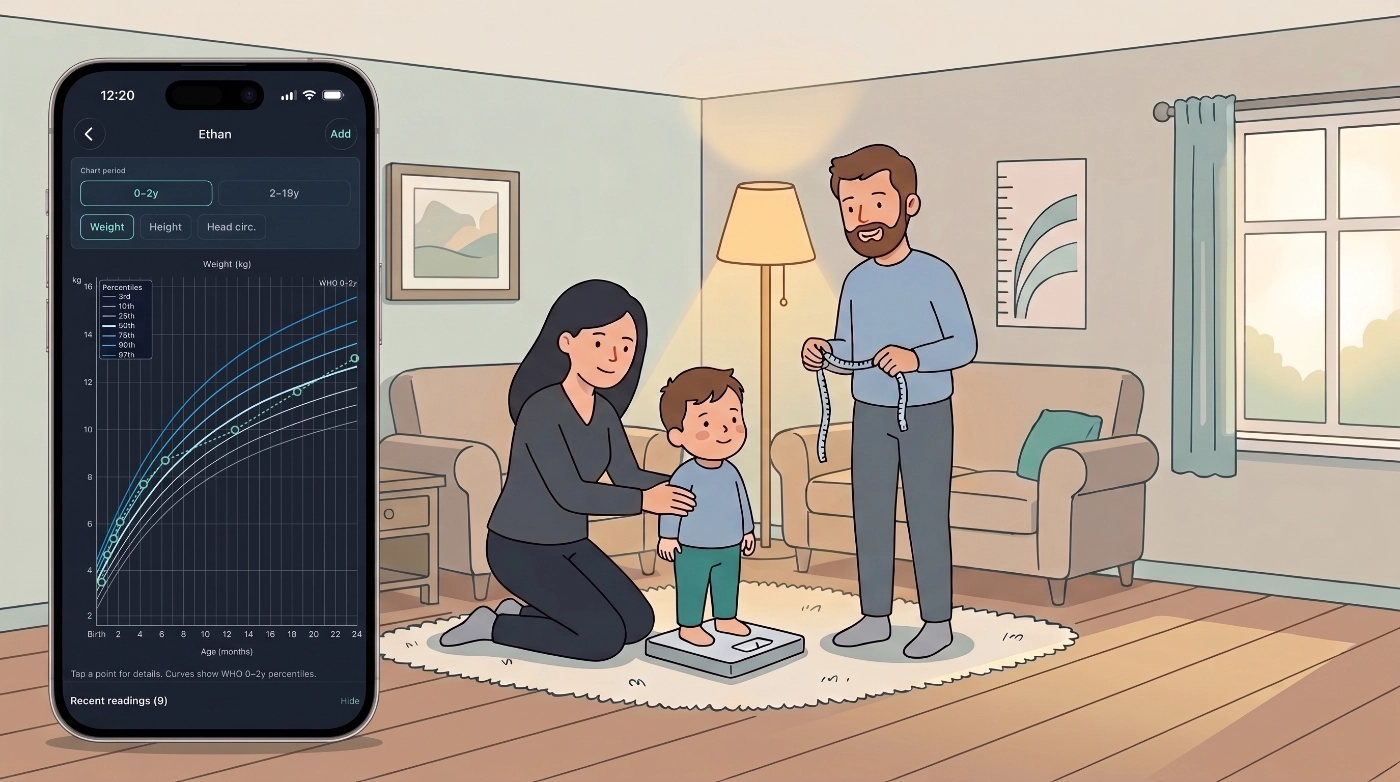
The six-week check. The school health form. The question after a bout of illness: are they back on their curve? For adults, the questions are different but familiar: weight creeping up, height unchanged for years, and a BMI band you want to watch without opening a separate app.
Medication Timer keeps those readings in the same household app you already use for medications, temperatures, and vitals. Growth & Development plots children’s measurements on WHO and CDC curves. Body metrics follows weight, height, and BMI trends for the whole family. Optional reminders and family reports mean you are not reconstructing a growth story from clinic printouts and fridge notes.
Charts and trends sit alongside the rest of your household health record, not in a separate spreadsheet or on the back of a blue book.
Available on iOS, Android, and the web app.
When measurements matter
Growth and body metrics are for the longer view: how someone is changing over weeks, months, and years, and what you might want to discuss at the next appointment.
You might track them when:
- Your GP or pediatrician asks for weight, height, or head circumference between visits
- You want to see whether a recent illness affected weight
- A teenager’s BMI-for-age is worth mentioning at the next check-up
- An adult in the household monitors BMI alongside other vitals
- You need a clear summary for a specialist or dietitian appointment
Charts are informational only. They are not medical advice. Percentiles describe how a measurement compares with population reference data; they do not diagnose growth concerns on their own. Discuss trends with your pediatrician, child health nurse, or GP.
Growth & Development for children
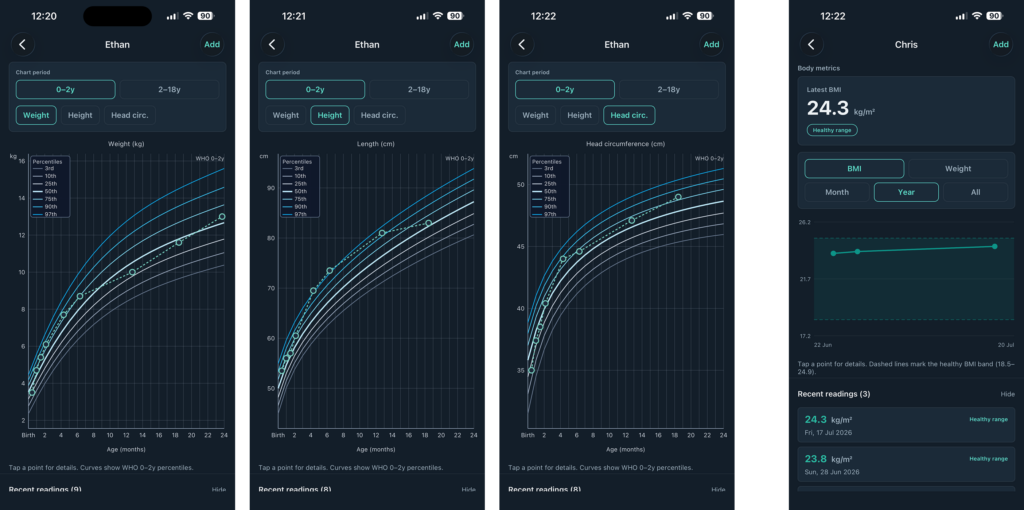
Growth & Development tracks weight, height, and head circumference for family members 18 and under, and plots logged points against standard reference curves:
- WHO growth standards (0–2 years) for weight, length/height, and head circumference
- CDC charts (2–18 years) for weight and height percentiles
- CDC BMI-for-age (2–20 years) when weight and height are logged on the same day, or height within the last 90 days
- Head circumference on WHO curves through about age 3 (not on CDC 2–18y charts)
Each reading is placed using the member’s age at the date of the measurement, so a check-up logged late still lands on the right part of the curve.
What you need on the profile
- Birth date. Age at each reading drives the percentile calculation.
- Sex. Set on the member profile, or inferred from Son/Daughter relationship.
Without a birth date, growth charts cannot compute percentiles accurately. Add or confirm these details when you set up a child, or before your first growth log.
Charts at a glance
Open Growth & Development from a family member card for children, or for anyone who has growth readings logged at age 18 or younger. Switch between weight, height, head circumference, and BMI tabs when the data supports them.
The chart shows reference percentile bands and your logged points over time. Tap a point to see the value and date. Review the reading list below the chart, add historical entries, or remove a mistaken log.
Body metrics for the whole household
Body metrics tracks weight, height, and BMI over time for any family member: children, parents, grandparents, and everyone else in your household.
- Adults see BMI with standard healthy-range bands when weight and height can be paired on the same day (or height within 90 days). Adult BMI does not use pediatric percentile curves.
- Children who need WHO or CDC growth percentiles should use Growth & Development instead. Body metrics is the right home for adult-style BMI trends and household weight tracking.
- Open Body metrics from the family member card for trend charts and a clear snapshot of the latest values.
If you already log weight and height as health readings, Body metrics turns that history into a chart without re-entering old clinic visits.
Where to log readings
You can add measurements wherever fits your routine:
- Family → Growth & Development: primary place to add growth readings for children (any historical date)
- Family → Body metrics: trends and charts for weight, height, and BMI for any member
- Family → Health readings: for members 18 and under, weight, height, and head circumference appear here with the growth sprout icon so you can set optional reminders. Adults can log weight and height here too
- Today: a growth or body-metric row appears only when that measurement is due from a reminder schedule or already logged (or skipped) on the day you are viewing. Tap the sprout or scale icon beside Readings to reveal weight, height, and head circumference (when applicable) and log from Today without cluttering the panel on quiet days
- Today check-in card: when you are viewing today and a family member has had no relevant Growth & Development or Body metrics log for 30 days (or never), Today can show a single soft card below the member list. Open goes to that member’s charts. Not now hides the card for 30 days on that device. Members who already have a reminder schedule for those readings are skipped so Today does not double-nudge
Empty “Tap to log” rows for growth and body metrics do not appear on Today unless you expand Readings or the type is scheduled or already recorded that day. That keeps Today focused on what is due, not a wall of empty placeholders.
Reminders, reports, and sharing
Set a reminder interval under Health readings when you want a nudge to re-weigh or re-measure. That helps after an illness, during a growth spurt, or when an adult is tracking weight over time.
With Family Care, growth and body-metric data goes further:
- Family reports include growth readings and body-metric summaries for the report period. Useful before a well-child visit, a dietitian appointment, or when a co-parent needs the same picture you have
- Shared coordination means another caregiver in the household sees the same logged readings and charts, without a separate notebook acting as your medical record
Export or share a report when you want a precise log instead of “I think they were about twelve kilos in March.”
Availability
Family Care: Growth & Development charts (WHO and CDC percentiles), Body metrics trends and BMI bands, chart summaries in family reports, optional reminder schedules for weight, height, and head circumference, and shared access for coordinated caregivers.
Free: Add family members with birth dates, log health readings within the app’s usual household limits, and use Today for scheduled or same-day entries. Percentile charts, Body metrics trend views, and growth summaries in family reports require Family Care.
Pricing varies by region. See the app or web subscription screen for your store.
Try it today
- Open Family in Medication Timer on iOS, Android, or the web app.
- Choose a family member and confirm birth date and sex for children.
- Tap Growth & Development or Body metrics.
- Log your first reading (including earlier clinic dates if you want to backfill) and open the chart.
You do not need to start on the day of the appointment.







