
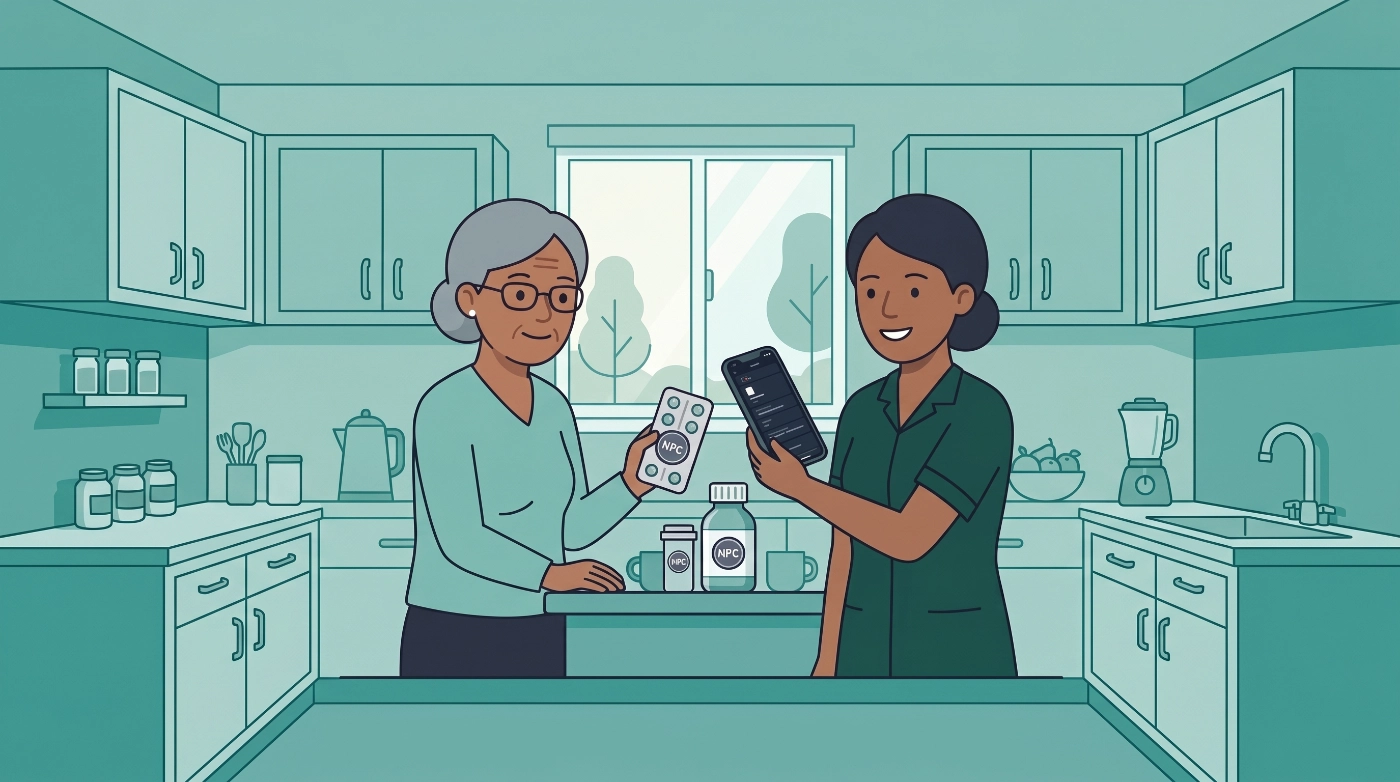
Have you tried to read the dosage line on a blister this week? Tiny print. Foil glare under the kitchen light. Glasses in the other room. A morning when your eyes, your hands, or your energy are not cooperating. You still need an honest log. Hunting through tabs is the last thing you want.
2.7.2 is for that moment. Family Care RFID coins let you stick a cheap NFC tag on the pack, hold the phone to it, and see the name, usual dose, and wait window in large type. Then you confirm the same log you would have made in the app. Fewer screens at the pack. Type you can actually read. We still ask you to confirm. The coin does not prove the medicine was swallowed, and it does not invent a dose.
This article also covers 2.7.1. We have not published release notes since 2.7.0. Shared reminders can now clear when another caregiver already logged that slot, so a leftover alert does not look like the dose never happened. The main 2.7.1 work was polish on our experimental travel overlay: clearer multi-city trips, travel doses you review with a GP or pharmacist, and mute options so destination hours do not wake the phone that stayed home.
Available on iOS, Android, and the web app. Programming a coin happens on iPhone or Android. The web app can save what a coin should do; you finish writing the chip with the phone.
RFID coins are Family Care. Price is shown in-store for your region. Anyone can open Profile → Devices to read how a tap works. Medication Timer does not sell tags.
What's in 2.7.2 (and 2.7.1)
- Large type at the pack (Family Care RFID coins): tap an NFC tag to read name, usual dose, and wait times when the box is hard to see, then confirm a log
- Fewer screens to log: mark a scheduled dose taken, log an as-needed dose, start a quick timer, or mark overdue routines taken. Queue more than one action. Leave who or which medicine blank if you want to choose when you tap
- Shared reminders: when someone else marks a slot taken or skipped, the alert can clear on other household phones, so a leftover banner does not look unfinished
- Experimental travel (2.7.1 / 2.7.2): clearer itineraries, hop-by-hop travel doses, Today grouping, and mute for caregivers at home. Still experimental
- Sharing & Access: scan an invite QR from the other person’s phone when you accept an invite
The coin is a shortcut to the same log you already use. Dose rules, wait windows, and Care timers do not change.
RFID coins for Family Care
Use RFID coins when the pack is in your hand and the label, the glare, or the next few taps in the app are the hard part: a morning tray, a nightstand blister, a shared kitchen box, or a medicine whose print you cannot comfortably read.
Open Profile → Devices. With Family Care, tap Add device:
- Queue one or more actions (up to eight).
- Optionally bind a family member, medication, routine, dosage, or saved quick timer. Each field can stay Ask when tapped.
- Name the coin (it defaults from your choices until you edit it).
- Hold the phone to the coin until programming finishes.
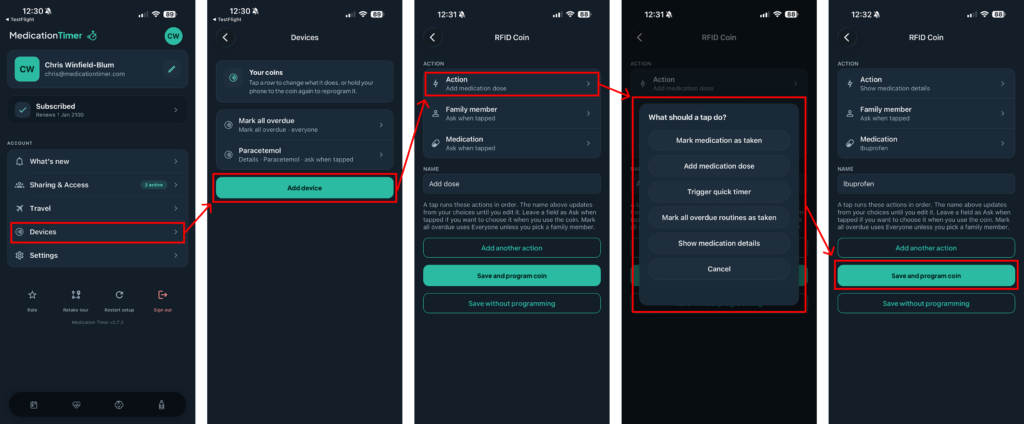
- Stick the coin on the pack, or keep it in a drawer next to the tray.
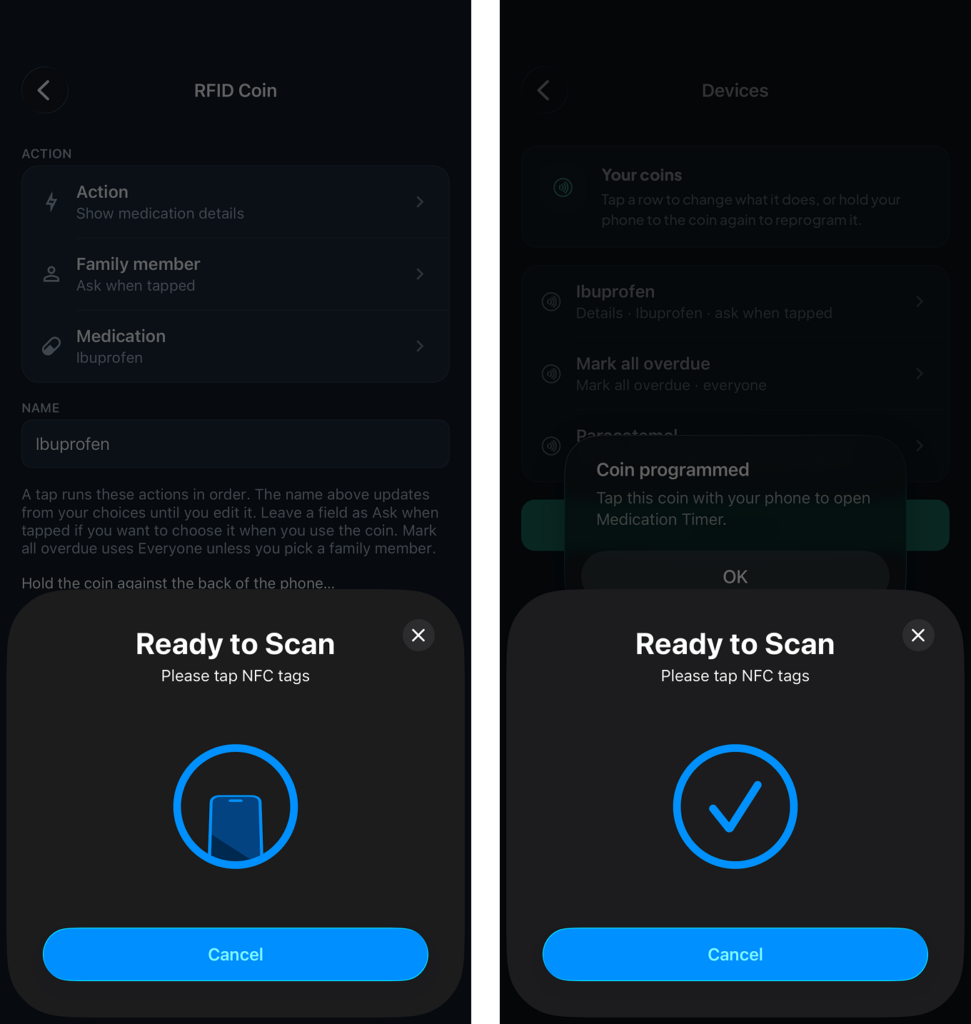
Later, tap the coin with the phone present (a few centimetres). A confirm screen shows the bound facts, fills any blanks, then runs the queue in order. Show medication details opens a read-only card with Log dose, and Mark routine taken when a slot is due.
A tap while you are not subscribed opens the Devices explainer, not a bare subscribe screen.
What a tap can do
- Mark medication as taken: completes a Today or Care course slot. Needs at least a member, medication, or routine. If nothing is due, the app says so. It does not invent an as-needed row.
- Add medication dose: starts an as-needed (PRN) log. Member and medication can wait until tap time. A member is required before it writes.
- Trigger quick timer: starts a saved Family Care preset. The member is already on that preset, so the coin does not ask who. Staggered presets always open review (they never dual-write from a tap). Other queued actions still run first.
- Mark all overdue routines as taken: every overdue routine for today, for one person or the whole household (Everyone if you leave the member blank). Skips waiting “after another medication” routines. Does not include doses that are only due soon.
- Show medication details: name, brand, strength, usual dose, wait between doses, maximum, notes, and related people, in large type (larger still with Large interface under Display preferences). Then Log dose or Mark routine taken. This repeats what you already stored in Medication Timer. It does not replace your pharmacist’s label.
You can queue these. A common pair is Add medication dose plus Trigger quick timer, so one tap at the pack logs the as-needed medicine and starts the wait.
Confirm is always required. There is no silent auto-taken. Duplicate confirm on the same coin within about 12 minutes does nothing after the first successful write.
What tags to buy
Medication Timer does not manufacture or ship coins. You buy ordinary NFC tags that a phone can read and write.
Buy this:
- NFC NTAG213 or NTAG215 stickers or coins (13.56 MHz, NFC Type 2). These are the tags iPhone and most Android phones can program.
- A coin or round sticker if you want it on a pack lid. Flat NFC stickers work on plastic bottles and cardboard boxes.
- Ferrite-backed (often sold as anti-metal) coins if the pack is foil or the bottle is metal. Foil blister packs block a normal sticker. A ferrite layer lets the phone see the chip from a few centimetres.
NTAG213 is enough. We write a short link, not a large file. NTAG215 also works if that is what the pack contains.
Skip this:
- 125 kHz RFID (many pet chips, older door fobs, cheap “RFID” key fobs that are not NFC)
- UHF RFID (warehouse pallet tags, inventory labels)
- Employee proximity badges that are not NDEF NFC
- Kitchen RFID readers, HomeKit, or Matter hubs. Devices in 2.7.2 is phone-to-coin only
If a listing says NFC, NTAG213, NTAG215, or 13.56 MHz NTAG, it is in the right family. If it only says 125 kHz, UHF, or “RFID proximity,” a phone cannot program it.
On Android, turn NFC on in system settings before you program. On iPhone, keep the app in the foreground while writing. Simulator and web cannot write a chip.
Example scenarios
When the box is hard to read. The dosage line is small, shiny, or both. Program Show medication details for that medicine. Tap the coin. The phone shows the name, usual dose, and wait window in large type. Then log from the card.
The morning tray. The 8:00 routine is the same every day, and you would rather not hunt for the right row. Stick a coin on that blister. Bind Mark medication as taken to that person and routine. Tap, confirm, done.
As-needed at 3am. Paracetamol lives on the nightstand, and the room is dark. Queue Add medication dose (and a quick timer if you use one for the wait). You still confirm. You still cannot log inside an active wait if the app would have blocked that in Today.
Catch-up after a busy morning. A drawer coin programmed to Mark all overdue routines as taken for one person, or for everyone. Use it when several due rows are sitting on Today and you did take them at the pack. It will not mark future slots or relative routines that are still waiting.
Two medicines that stagger. If your quick timer is a staggered pair, the coin will not fire both writes at once. Other queued actions run, then the app opens review so you can confirm the stagger the same way as in the app.
Shared household. The kitchen box has one coin. Leave who as Ask when tapped. Any Family Care caregiver signed in on that household can tap with their phone, pick who, and confirm. The log is the shared household log.
When taps in the app are the hard part. Stiff hands, a tremor, a sling, or a one-handed morning: holding the phone to a sticker is fewer steps than navigating tabs. The confirm screen is still a deliberate tap. The point is less hunting, not a skip of judgement.
Someone covering a dose. A grandparent or neighbour who knows the pack but not the app. The details card shows what the medicine is, in a size they can read, then they log. Invite them through Sharing & Access first so they are in the household.
RFID coins FAQ
Do you sell the coins?
No. Buy NFC NTAG213 or NTAG215 stickers or coins from an electronics retailer. Medication Timer only programs them.
Is this Family Care?
Yes. Programming and tap-to-log require Family Care. Everyone can open Profile → Devices and read the explainer. Price is shown in-store for your region.
Does a tap mean the medicine was swallowed?
No. Same as logging in the app: you confirm an action. The coin does not watch the pack, weigh pills, or give clinical advice.
Can I use the web app?
You can create or edit what a coin should do on the web app. Hold an iPhone or Android phone to the coin to write the chip. Taps that open the app use the phone.
What if I tap the wrong coin or the wrong account?
The chip stores a short link to that household device. If the coin is not in your household, or the binding is missing, the app asks you to reprogram. Sign in to the household that owns the coin.
Why didn’t the phone see the coin?
Keep it within a few centimetres of the back of the phone. Foil packs need a ferrite-backed coin. On Android, turn NFC on. On iPhone, the screen should be on. Cases with metal plates can block NFC; try without the plate.
Can I program a coin for skip, snooze, or travel?
Not in this version. Coins log or show details. They do not skip, snooze, mute, end travel, mark running low, or give dosing advice.
Experimental travel: what improved
Travel remains experimental. 2.7.0 shipped the sneak peek. 2.7.1 and 2.7.2 make that overlay easier to live with. It is still a trip-only layer over your usual routines. Medication Timer does not invent a destination dosing plan.
Use it to plan time-critical medications for long-haul trips with your GP or pharmacist. Preview how clocks jump on the way and after you land, agree extras or skips with them, then save.
What improved since 2.7.0:
- Clearer multi-city itineraries: Add city, Return home, arrive and depart times local to each city
- Travel doses when a hop jumps by 4 hours or more and a usual time falls in transit. Short hops stay on clocks unless you choose Show travel doses
- Today groups people on a trip separately from At home
- Mute destination-hour reminders on the phone that stayed home (Family Care), and mute people who stayed home on the travelling phone
- Other caregivers can get a notice when travel is saved, so their app can catch up
Usual clocks keep firing in the city you just left until you arrive. Destination clocks start at arrival. Reminder records do not change. When travel ends, times go back to normal.
This is an early release: expect rough edges, and confirm important doses with your clinician if something looks off. Open Travel from Profile or Today, or when the phone names a new city after a timezone change.
Help: What happens when I travel to another timezone?
Also in 2.7.1 and 2.7.2
- Shared dose and reading reminders can clear when another caregiver logs or skips that slot, so a leftover alert does not look like the dose was never done (best-effort on phones in the background; open the app if one is still showing)
- Sharing & Access: scan the invite QR on their phone when you accept an invite
- Android: allow Alarms & reminders, and keep Medication Timer out of sleeping apps, so lock-screen dose alerts can fire on time
- Travel timezone detection and mute prompts are calmer when the phone names a new city
Did you miss what changed in 2.7.0?
2.7.0 was the last set of notes we published. If you skipped that update, you already have:
- Care wellness readings on Family Care: Hydration, Passed fluids, Stool, Eating, Sleep, Mood, and Vomit
- Edit what to track while a care session is already running
- The first experimental travel overlay for long-haul planning with your GP or pharmacist
More detail: Medication Timer 2.7.0: Wellness check-ins in Care.







